- Key Takeaways
- What Is Cost Allocation in Accounts Payable?
- Cost Allocation vs. GL Coding vs. Cost Apportionment: What’s the Difference?
- What Distinguishes Manual Cost Allocation from Automated Workflows?
- What’s the Difference Between Rule-Based Allocation and AI Allocation?
- What’s The Difference Between Cost Allocation and Cost Apportionment?
- How Do Standard GL Coding and Comprehensive Invoice Coding Differ?
- Where Costs Get Distributed: Common AP Allocation Dimensions
- Cost Allocation Methods: How Invoice Splits are Calculated
- Where Manual Cost Allocation Breaks Down
- The Real Cost of Poor AP Cost Allocation Practices
- How AP Automation Streamlines the Cost Allocation Workflow
- Conclusion
- FAQs About Cost Allocation in AP
An invoice often touches multiple departments, such as a software subscription shared by marketing, sales, and IT. Accurately dividing these expenses is critical for finance teams. When costs are misassigned, reports become unreliable, budgets are distorted, and month-end close cycles slow down.
Manual cost allocation eats up hours. According to the Institute of Financial Operations & Leadership (IFOL) Accounts Payable Automation Trends 2025 report, 63% of accounts payable (AP) teams spend more than 10 hours per week processing invoices. They juggle spreadsheets, chase email approvals, and enter the invoice split into the ERP more than once, much like the bumpy road every manual process travels.
AP automation solves this by applying your allocation rules the moment an invoice arrives, so the cost allocation happens on its own as part of a fully touchless invoice process.
Key Takeaways
- Cost allocation in AP splits one invoice across the cost centers, departments, or entities that share it.
- GL coding picks the account. Invoice coding adds the cost center, project, and entity.
- AP automation applies your allocation rules as each invoice arrives.
What Is Cost Allocation in Accounts Payable?
Cost allocation in accounts payable is the process of dividing an invoice across multiple cost centers, departments, projects, or legal entities so that expenses are recorded accurately in financial statements. Proper cost allocation improves budgeting, profitability analysis, financial reporting accuracy, and audit compliance.
Beyond keeping budgets accurate, it helps expenses land in the department, supporting Generally Accepted Accounting Principles (GAAP) compliance.
Expert View
Controllers treat cost allocation as a reporting control, not just an AP task. If a split is wrong when the invoice arrives, the reports built on it, from department budgets to profit margins, start off wrong before month-end review even begins.
Cost Allocation vs. GL Coding vs. Cost Apportionment: What’s the Difference?
Cost allocation, GL coding, and cost apportionment sound alike but do different jobs in AP, so here is how they compare.
What Distinguishes Manual Cost Allocation from Automated Workflows?
Manual cost allocation requires typing line distributions using quantity, percentage, or amount splits while invoice lines are in a draft or exception state. SSON reports that 35% of finance practitioners rank invoice coding as their single biggest AP frustration.
Automated cost allocation streamlines the AP lifecycle by reducing manual data entry through smart invoice capture and automating multi-level approval workflows.
What’s the Difference Between Rule-Based Allocation and AI Allocation?
Rule–based allocation works on “if-this-then-that” logic. Ideal for repetitive, low-variation tasks, but struggles with non-PO invoices or new supplier formats.
AI allocation uses machine learning to adapt, auto-code GLs, detect anomalies, and learn about approval behaviors over time.
What’s The Difference Between Cost Allocation and Cost Apportionment?
Cost allocation is the broader process of assigning costs to cost centers, projects, or departments.
Cost apportionment is the method used for shared costs: it spreads indirect overhead across departments using a cost driver such as headcount or floor space.
How Do Standard GL Coding and Comprehensive Invoice Coding Differ?
GL coding is focused on selecting the General Ledger account number to categorize the expense type (e.g., “office supplies”). For a deeper look at how general ledger categorization operates independently, read our complete guide to GL coding.
Invoice coding is the comprehensive process combining GL accounts with cost centers, projects, and entities before ERP posting. Cost allocation in AP happens at the invoice-coding stage.
Where Costs Get Distributed: Common AP Allocation Dimensions
Before you split a bill, you need to know where each dollar belongs. Costs in accounts payable fall into five categories:
- Cost Centers and Departments: The most common split. Splitting shared operational bills (rent, software) across functional teams like Sales, HR, and Engineering.
- Direct Allocation vs. Multi-Department Splits: When a bill belongs to one group (like safety boots for the warehouse crew), it uses direct allocation, and the full cost goes to a single business unit. When a vendor’s bill covers tools used by multiple teams, it turns into a multi-department split.
- Project & Job Costing: Expenses linked directly to specific client jobs or projects are separated from team budgets, ensuring precise profit tracking for billable work.
- Multi-Entity Allocations: Global organizations frequently assign expenses across subsidiaries, branches, or legal entities while ensuring intercompany balances remain accurate.
- Shared Services Allocation: Corporate functions such as HR, IT, Legal, Procurement, and Facilities are often allocated to business units based on defined allocation drivers.
Cost Allocation Methods: How Invoice Splits are Calculated
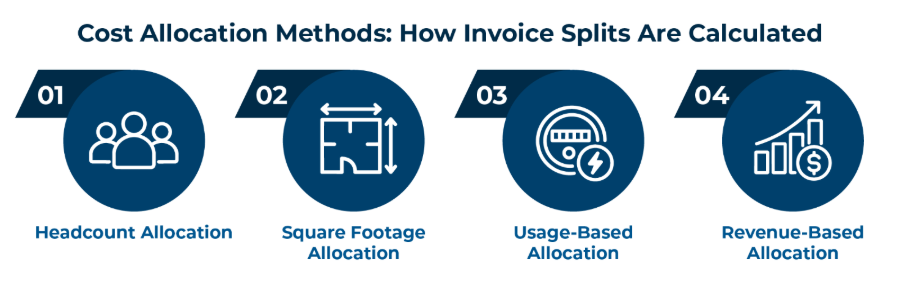
Once an expense needs to be split across multiple departments or entities, finance teams apply one of four core allocation drivers:
- Headcount Allocation: Splitting shared overhead (like company-wide software licenses, HR platforms, or general office amenities) based on employee headcount per department.
- Square Footage Allocation: Distributing facility-related costs (such as utilities, building maintenance, or common-area insurance) based on the physical floor space occupied by each business unit.
- Usage-Based Allocation: Apportioning consumption-driven costs (such as cloud hosting servers, utility power sub-meters, or telecom bandwidth) based on actual metered consumption metrics.
- Revenue-Based Allocation: Distributing central corporate overhead or shared marketing expenses across subsidiaries or product lines proportionally based on their respective revenue contributions.
Where Manual Cost Allocation Breaks Down
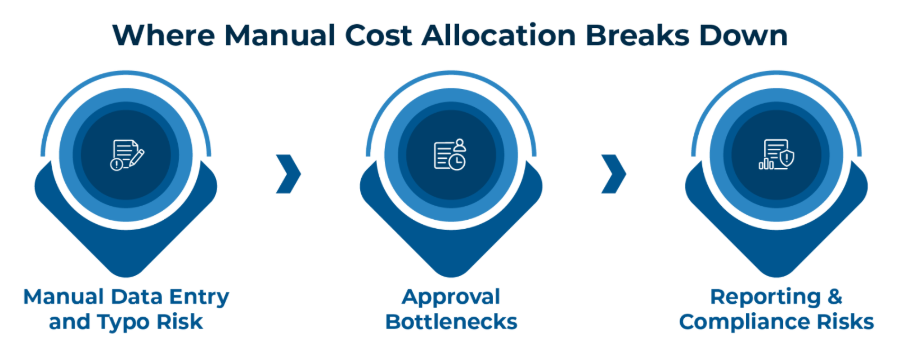
Relying on manual entry to split invoices puts unnecessary strain on your accounting team. As volume grows, it hits three walls:
- Manual Data Entry and Typo Risk: Entering multiple split lines by hand invites matching errors. According to IFOL, 47.1% of finance teams report data errors cause severe processing delays, while Ardent Partners reveals that 18.4% of incoming invoices trigger exceptions.
- Approval Bottlenecks: A shared invoice often needs sign-off from more than one cost center owner. Without a clear process, it can sit in an email thread for days or get missed altogether.
- Reporting & Compliance Risks: Incorrect expense splits distort budget-versus-actual reports, making it much harder to maintain GAAP compliance. This is one reason manual invoice processing ends up costing businesses more than they think.
The Real Cost of Poor AP Cost Allocation Practices
When cost allocation fails, inaccurate cost distribution creates systemic financial risks across the enterprise:
- Incorrect Departmental Reports: Misassigned expenses corrupt departmental results. According to Coupa’s Strategic CFO Report, 49% of finance leaders lack full spend visibility, and 43% cannot make informed decisions due to fragmented ledger data.
- Hidden Budget Overruns: Misplaced expenses mask real spending spikes in specific cost centers, making it difficult for budget owners to make adjustments in time.
- Distorted Profitability Analysis: Inaccurate cost distributions skew product, department, project, or customer profit margins.
- Elevated Audit Risk: Without clean documentation and clear approval trails, finance teams struggle to justify split decisions during compliance audits.
- Month-End Bottlenecks: Unresolved allocations create friction, forcing extensive rework and delaying the close cycle. Learn how finance teams are overcoming these hurdles in our guide on accelerating your monthly financial close.
When these discrepancies multiply across thousands of invoices, reporting quality deteriorates, and executives lose trust in the numbers. See the full ROI case for automating AP.
How AP Automation Streamlines the Cost Allocation Workflow
AP automation turns cost allocation into one repeatable workflow of five connected steps.
- Multi-Channel Ingestion & AI Data Capture: Capture invoices from any source (email, portal, scanned PDF) and use AI/ML to extract headers, totals, and line items without rigid templates.
- Master Data Matching & Duplicate Verification: Cross-check vendor records, PO numbers, and currency against ERP master data while running an automated check to flag duplicate submissions.
- Rule-Based Allocation & Tax Apportionment: Apply preconfigured split rules across target ledger accounts, cost centers, and legal entities (by percentage, fixed amount, or dynamic usage), automatically calculating proportional tax/VAT line splits.
- Targeted Multi-Level Approval Routing: Route individual split lines directly to the respective department heads or budget owners based on your organizational hierarchy and spend thresholds.
- Direct ERP Validation & Multi-Line Posting: Perform a real-time Chart of Accounts validation and write balanced debit/credit distribution lines directly into your ERP (SAP, Oracle, NetSuite, etc.) without manual typing.
According to Ardent Partners’ State of ePayables report, top-performing automated teams cut per-invoice processing costs by 79% (down from $12.42 to $2.65) and shrink processing cycle times by 79% (from 13.5 days down to 2.9 days).
Conclusion
Manual cost allocation turns everyday business expenses into a month-end scramble of broken spreadsheets, delayed approvals, and costly GL miscodes. Bringing smart AP automation directly into your invoice coding workflow reduces repetitive typing, protects departmental budgets, and helps keep your books audit ready.
Don’t let shared vendor bills slow down your finance team. [Book a demo today] to see how seamless, accurate cost allocation can be.
FAQs About Cost Allocation in AP
Direct allocation assigns the full cost to one group; indirect allocation splits shared costs using rules like headcount or square footage.
The system divides invoices across legal entities, routes approvals, and posts balanced intercompany entries.
Yes. Percentage-based and usage-based rules recalculate automatically as the invoice total changes each month. Only fixed-amount splits require manual adjustments if the total shifts.
GL coding names the expense type; invoice coding combines GL accounts with cost centers and operational dimensions.
Automation applies consistent business rules, reduces manual entry errors, maintains approval workflows, and provides a complete audit trail.
Map current rules, configure them in your AP automation platform, and run parallel tests before full adoption.
Automated cost allocation is the system-driven process of dividing invoice line items across multiple cost centers, GL accounts, or entities based on pre-set rules or AI.
Its primary benefits include a faster month-end close, fewer coding errors, and a clear audit trail for every dollar, no matter how many cost centers it touches.