Introduction
According to the Institute of Finance and Management (IOFM), approximately 47% of all enterprise invoices arrive without a purchase order (PO). No pre-approval. No spend commitment on record. Just a vendor invoice that needs to be coded, routed, and paid. In SAP, these invoices create a real control problem. A study by Ardent Partners found that non-PO invoices take an average of 13.9 days to process, compared to 11.4 days for PO invoices.
This blog walks through non-PO invoice processing in SAP, the risks that come with managing it manually, and how accounts payable (AP) automation gives finance teams the visibility and control to fix it.
What is a Non-PO Invoice?
A non-purchase order invoice or a non-purchase order, also called an expense invoice, is any vendor invoice received without a corresponding PO behind it. With PO-based invoices, the expense is pre-approved: procurement raises a PO, goods are received (GRN created), and the invoice is matched against both. With non-PO invoices, the expense has already happened, leaving no upstream document in SAP for AP to validate against it.
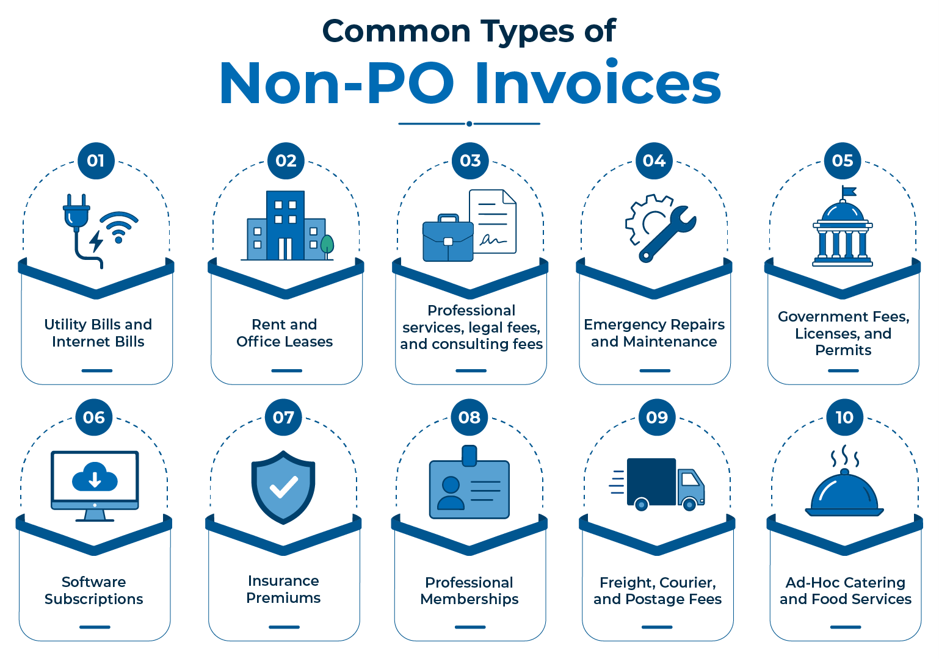
Non-PO vendor invoices cover a wide range of indirect expenses, including:
How Do You Manage Non-PO Invoices in SAP?
SAP is built around structured purchasing. The PO is the reference point; it carries the vendor, the amount, the cost center, and the pre-approval. Without a PO, that entire structure collapses. Non-PO vendor invoices are posted through FB60 in the SAP FI module, with no reference document to pull values from and no validation built in. For each invoice, the AP team is left asking:
- Who owns this invoice?
- Is this expense actually legitimate?
- Which cost center does it belong to?
- What is the correct GL account?
- Which tax codes apply?
- Who needs to approve it, and in what order?
There is no system-driven SAP workflow to answer any of these questions. No built-in validation to flag exceptions. To understand the full extent of what SAP does not handle natively, see why SAP alone falls short for modern accounts payable automation.
What Are the Risks of Manual Non-PO Invoice Processing?
Manual non-PO invoice processing in SAP exposes the business to compounding financial and compliance risks:
- Slow, unstructured approvals: Without a PO, there is no clarity about buyer or pre-defined approval path. Invoices sit in inboxes or queues, causing delays, missed payment terms, and strained supplier relationships.
- Manual GL Coding: AP teams must manually determine the correct cost center and general ledger (GL) account and enter it into SAP. Without automated validation, mistakes are often discovered only during reconciliation.
- Lost spend visibility: Non-PO invoices arrive after the expenditure has already happened, so finance loses preventive visibility and cannot enforce budget control at the point of purchase.
- Duplicate Payments: It depends entirely on consistent invoice references and manual review. If invoice numbers, vendor names, or reference fields are entered inconsistently, the chance of duplicate processing rises. Learn more about the hidden risks of invoicing without a GRN.
- Compliance Risk: Non-PO means no pre-validated vendor, amount, or service description. Inflated charges and fictitious invoices are harder to detect. When auditors ask for documentation, there is no upstream approval trail to show.
How to Automate Non-PO Invoice Processing Workflows?
To truly regain control over non-PO expenditures, finance teams need intelligent workflow automation software that sits directly before SAP, managing every incoming non-PO vendor invoice before they enter SAP.
Here is how the process works:
- Capture and AI extraction: The workflow automation software retrieves the invoices from email, PDFs, or scanned documents and extracts every field automatically.
- Validation: Extracted invoice data is validated against vendor master records and business rules before it enters SAP. Exceptions are flagged before they become errors.
- Intelligent GL Coding and Routing: The system analyzes historical transactions data to auto-suggest the correct General Ledger (GL) account and cost center, eliminating manual guesswork.
- Rule-based approval workflow: Invoices are routed based on predefined rules like spend threshold, vendor type, and department with automatic escalation if approvals are delayed.
- Seamless SAP Integration: Once approved, the validated invoice is posted directly into SAP. It receives clean, structured data without a single manual entry.
- Real-time visibility: A single dashboard shows every non-PO vendor invoice in the workflow where it is, whose approval is holding it up, and what is due for payment.
This is what workflow automation software delivers for non-PO vendor invoice processing: speed and control at every step. If you are evaluating whether to extend SAP or adopt a standalone solution, this CFO decision guide on SAP vs standalone AP automation breaks it down.
Take Control of Non-PO Invoice Processing in SAP
Managing non-PO invoices manually in SAP is a drain on your AP team’s resources and a permanent blind spot for corporate compliance. While you cannot prevent non-PO expenses entirely, investing in a robust AP automation solution transforms this inefficient process into a streamlined, cost-effective workflow. By automating GL coding, data validation, and invoice approval workflows, your finance team can significantly reduce bottlenecks that slow your AP team down. Upgrade your accounts payable strategy today to safeguard your operations and ensure full spend visibility before an invoice ever enters SAP.
If your organization is midway through an SAP ECC to S/4HANA upgrade, your compliance risk compounds significantly. Learn why dividing your AP processes during a legacy migration can sabotage your financial controls.
Schedule a demo today to see how Compleo Invoice Platform (CIP) manages non-PO invoices end to end.
FAQs
The 4 types of purchase orders (PO) used in procurement are
Standard PO: for a one-time purchase.
Planned PO: advance commitment with flexible delivery.
Blanket PO: for regular, recurring purchases from the same vendor.
Contract PO or long-term vendor relationships.
Predictive GL Coding: Uses historical transaction data to auto-suggest the correct General Ledger account and cost center.
Automated Extraction: Eliminates manual data entry by reading and capturing invoice fields instantly.
Duplicate Detection: Automatically flags identical reference numbers or amounts before payment.
Dynamic Routing: Configures rule-based approval workflows based on budget thresholds.
MIRO is used to post PO-based invoices in the SAP MM module, where the system automatically performs a three-way match against the PO and GRN. FB60 is used in the SAP FI module to post non-PO invoices. FB60 does not have built-in validation.
Deploy AP automation software that validates every incoming invoice against existing SAP data, automatically blocking identical combinations of vendor ID, invoice reference number, amount, and date before the data reaches FB60.
Approval paths vary by company policy; some route by spend threshold, others by vendor type or department. AP automation software standardizes this with predefined routing rules that send each non-PO invoice to the right approver automatically, with escalation if sign-off is delayed.