- Why AP Automation Strategy Has Become a Boardroom Discussion
- What is Hybrid AP Automation?
- How Does Hybrid AP Automation Work?
- Hybrid AP Automation Architecture Overview
- Hybrid AP Automation Workflow Example
- What Are the Challenges of Cloud-Based AP Automation?
- What Are the Challenges of On-Premises AP Automation?
- What Are the Challenges of Hybrid AP Automation?
- Hybrid vs On-Premises vs Cloud AP Automation: Key Differences
- What are the Benefits of Hybrid AP Automation?
- How to Choose Between On-Premises, Cloud, and Hybrid AP Automation
- When Hybrid Is NOT the Right Choice
- What to Look for in a Hybrid AP Automation Platform
- Conclusion
- FAQs About Hybrid AP Automation
Cloud adoption keeps growing. According to Gartner, public cloud services are forecast to grow 21.3% in 2026. But replacing an enterprise resource planning (ERP) system is costly and slow, so many finance teams keep the one they have. Gartner research reported by The Register in February 2025 estimated that over 60% of SAP customers were still on ECC 6 on-premises with no decision yet to move.
At the same time, compliance requirements keep increasing. Teams want new tools without disrupting daily work. Yet the choice has been hard. On-premises systems give you control, but they can be rigid and costly. Full SaaS starts fast, but some teams worry about data security. For a buyer’s view, see what CFOs need to know before choosing an AP platform.
Hybrid accounts payable (AP) automation offers a middle path. It combines the secure control of on-premises systems with the speed and flexibility of the cloud. You can process invoices without disruption to your existing ERP. This guide compares all three options, so you can choose what suits you best.
Why AP Automation Strategy Has Become a Boardroom Discussion
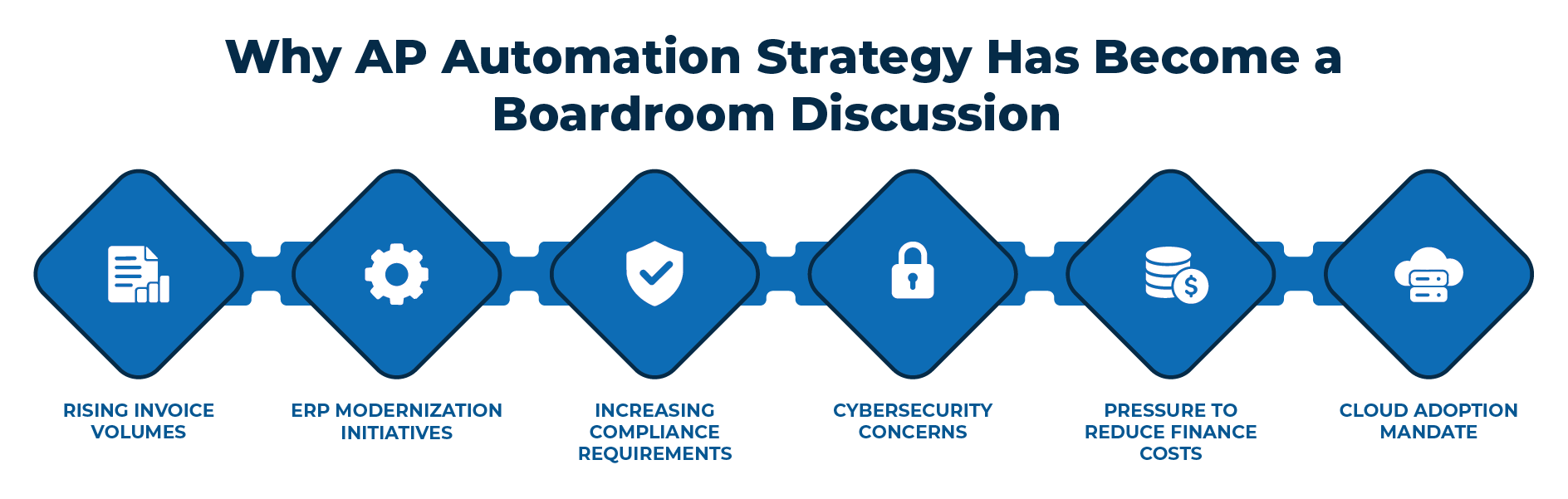
AP used to be a back-office task. Today it affects cash, risk, and control. To handle these demands, CFOs are shifting to hybrid automation for these reasons:
- Rising invoice volumes: More suppliers, channels, and formats mean more invoices. Manual work struggles to keep up.
- ERP modernization initiatives: Many companies update their ERP in stages. AP has to work with the old system and the new one during the move. See how to modernize your AP process during SAP migration.
- Increasing compliance requirements: Boards are accountable for financial control. They want AP to show who approved what, and when.
- Cybersecurity concerns: AP handles bank details and payments, which makes it a target. AFP’s 2026 survey found that 76% of US organizations faced attempted or actual payments fraud in 2025. Learn how to prevent corporate payment fraud through secure workflows.
- Pressure to reduce finance costs: Boards expect finance teams to do more with less. Faster, cleaner invoice handling frees people for higher-value work.
- Cloud adoption mandate: Many companies set cloud-first goals. Yet some data must stay in-house for security or legal reasons. Hybrid AP automation lets teams follow the cloud plan while keeping that data on their own servers
What is Hybrid AP Automation?
Hybrid AP automation is a setup where some invoice tasks run in the cloud and the rest run on the on-premises servers. The two sides share data and hand off work. It suits companies that run an on-premises ERP and want cloud speed.
How Does Hybrid AP Automation Work?
Hybrid AP automation works across three layers. The cloud layer handles fast, shared tasks, such as invoice capture and approvals. A secure on-premises sync agent links the AP automation software to your local ERP. The sync agent exchanges only what each side needs.
Hybrid AP Automation Architecture Overview
A hybrid AP automation platform usually has six components. Machine Learning (a more accurate system compared to the classical OCR) turns invoices (scanned, electronic, or any other kind) into machine-readable text. AI extraction picks out key fields, like amount, tax data, invoice details, and due date. Workflow routes each invoice for review and approval. The on-premises component facilitates secure data exchange with your ERP. A document archive stores invoices for audits. A security layer controls who can see and change data.
Hybrid AP Automation Workflow Example
- Invoices arrive through a cloud portal, by email, or by file.
- Cloud AI reads and checks the invoice data.
- The AP automation software matches the extracted invoice data against ERP records, such as purchase orders and vendor masters. Learn how to automate 3-way matching.
- Approvers review and approve online.
- Approved invoices are posted into your ERP (e.g., SAP, Oracle, Dynamics, or any others)
What Are the Challenges of Cloud-Based AP Automation?
Cloud-based AP automation, also called SaaS AP automation, is quick to start. It also has trade-offs worth weighing.
- Internet dependency: Cloud AP software needs a steady internet connection. If the connection is slow or down, teams may be unable to capture, route, or approve invoices.
- Data security and compliance questions: Invoice and supplier data is stored off-site, which has compliance risks. Data residency rules in some industries and regions can also make a shared cloud harder to use.
- Dependency on outside vendors: You rely on the vendor for updates and pricing. If the vendor changes its terms, you have limited say. Moving to another vendor later is a complex non-core business activity that brings additional costs and uncertainty.
What Are the Challenges of On-Premises AP Automation?
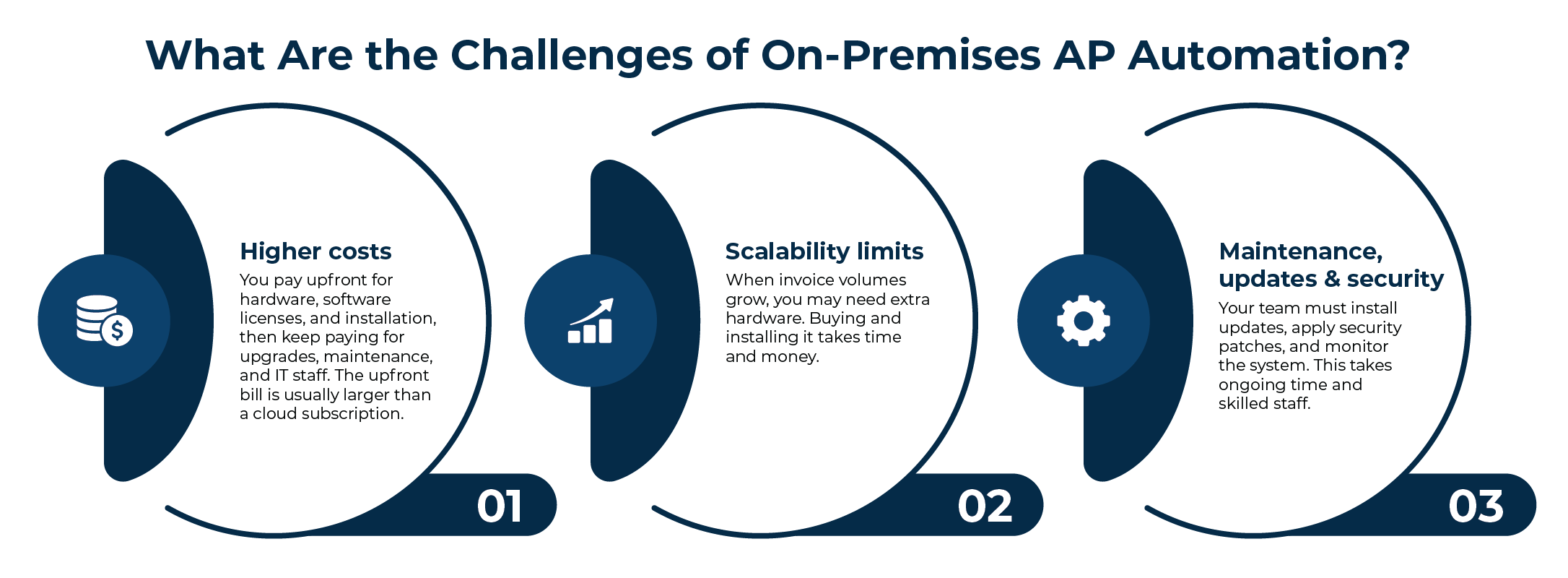
On-premises AP automation runs on your own servers, so it gives you direct control. It also puts more cost and work on your team.
- Higher costs: You pay upfront for hardware, software licenses, and installation, then keep paying for upgrades, maintenance, and IT staff. The upfront bill is usually larger than a cloud subscription.
- Scalability limits: When invoice volumes grow, you may need extra hardware. Buying and installing it takes time and money.
- Maintenance, updates, and security: Your team must install updates, apply security patches, and monitor the system. This takes ongoing time and skilled staff.
What Are the Challenges of Hybrid AP Automation?
Here are the main drawbacks to consider and how teams manage them.
- More complex architecture: A hybrid setup has cloud and on-premises components that must work together, requiring initial coordination and oversight from your IT team.
- Multiple environments to manage: Your team looks after two environments, not one. Clear ownership of each side avoids gaps, and a vendor that runs the cloud side can lighten the load.
- Requires governance: Someone must set rules for data access, approvals, and updates on both sides. Gartner lists governance of hybrid environments among the top cloud challenges for 2026.
- Integration planning required: The on-premises sync solution must integrate with your ERP. Mapping data and testing early helps prevent delays.
Hybrid vs On-Premises vs Cloud AP Automation: Key Differences
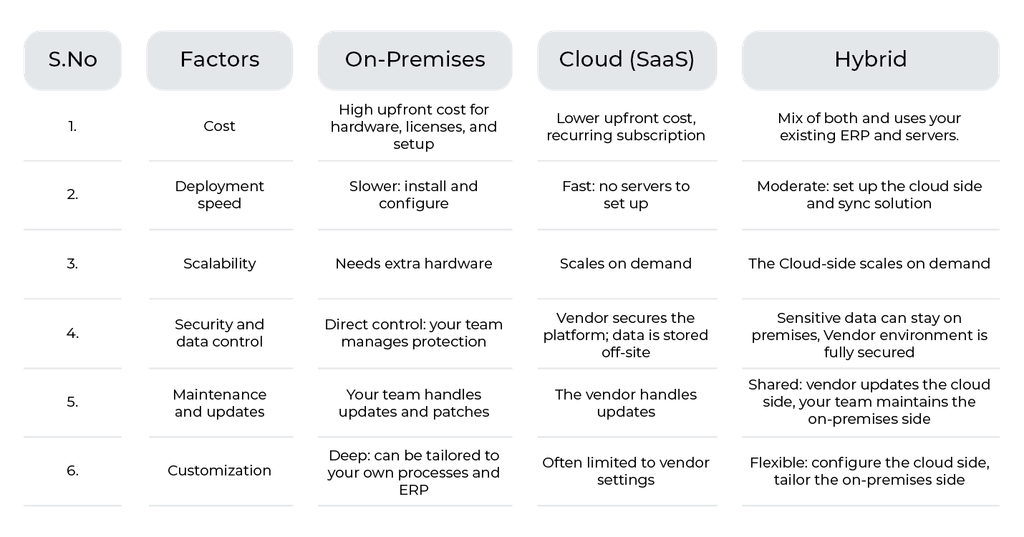
Each model handles cost, growth, and control differently. This table shows how.
What are the Benefits of Hybrid AP Automation?
Here are the main benefits of hybrid AP automation:
- ERP flexibility: The sync solution seamlessly integrates cloud tools with a wide range of complex ERPs.
- Data residency: You can keep sensitive records on your own servers to meet local rules.
- Security controls: You choose who can see and change data on both sides.
- Protected ERP investment: You keep using the ERP you already paid for.
- Phased modernization: You move to the cloud in phases, at your own pace.
- Lower migration risk: Smaller changes mean less disruption than replacing your whole ERP.
How to Choose Between On-Premises, Cloud, and Hybrid AP Automation
Start with what matters most to your team, then match it to a model.
- Cloud (SaaS) suits teams that want to go live quickly, let staff work from anywhere, and leave servers and updates to the vendor. It often suits startups and small and mid-sized businesses.
- On-premises is ideal for environments that must keep data and uptime in their own hands, with long-term plans and strict needs for data residency and deep customization. Examples are banking, government, and healthcare.
- Hybrid is suitable for teams that want cloud automation around an ERP that must stay on-premises. According to market insights from Gartner, an overwhelming 90% of enterprises are projected to integrate hybrid cloud strategies into their operations through 2027.
For a deeper look at the platform options, consider comparing CIP vs. VIM tools to see how agnostic architectures fit your landscape.
When Hybrid Is NOT the Right Choice
Hybrid AP automation suits many teams, but not all. It may not be ideal if:
- You are already fully cloud-native: Your ERP and tools run in the cloud, so full SaaS AP automation is simpler.
- You are replacing your ERP within 12 months: A hybrid setup may not pay off in that time. If you do choose hybrid, pick a platform that works with both your current and new ERP.
- You have minimal integration needs: A standalone cloud tool may be enough.
- Your compliance requirements are low: Without strict data residency or control needs, the extra setup of hybrid may not be worth it.
What to Look for in a Hybrid AP Automation Platform
Use these seven checks to compare vendors:
Integration with your ERP
- ERP-agnostic connectivity: Does it work with your ERP and its version, and not just one system?
- Flexible deployment: Can you run some parts in the cloud and others on-premises and change the balance later?
Security and control
- Secure architecture: Does it protect data in transit and at rest and keep sensitive data where you choose?
- Auditability: Can you trace each invoice from receipt to posting?
Automation
- AI-powered data extraction: Does it read invoices accurately and cut manual entry?
- Workflow automation: Can you set approval rules, routing, and exception handling?
Growth
- Scalability: Can it handle more invoices, suppliers, and entities as you grow?
Conclusion
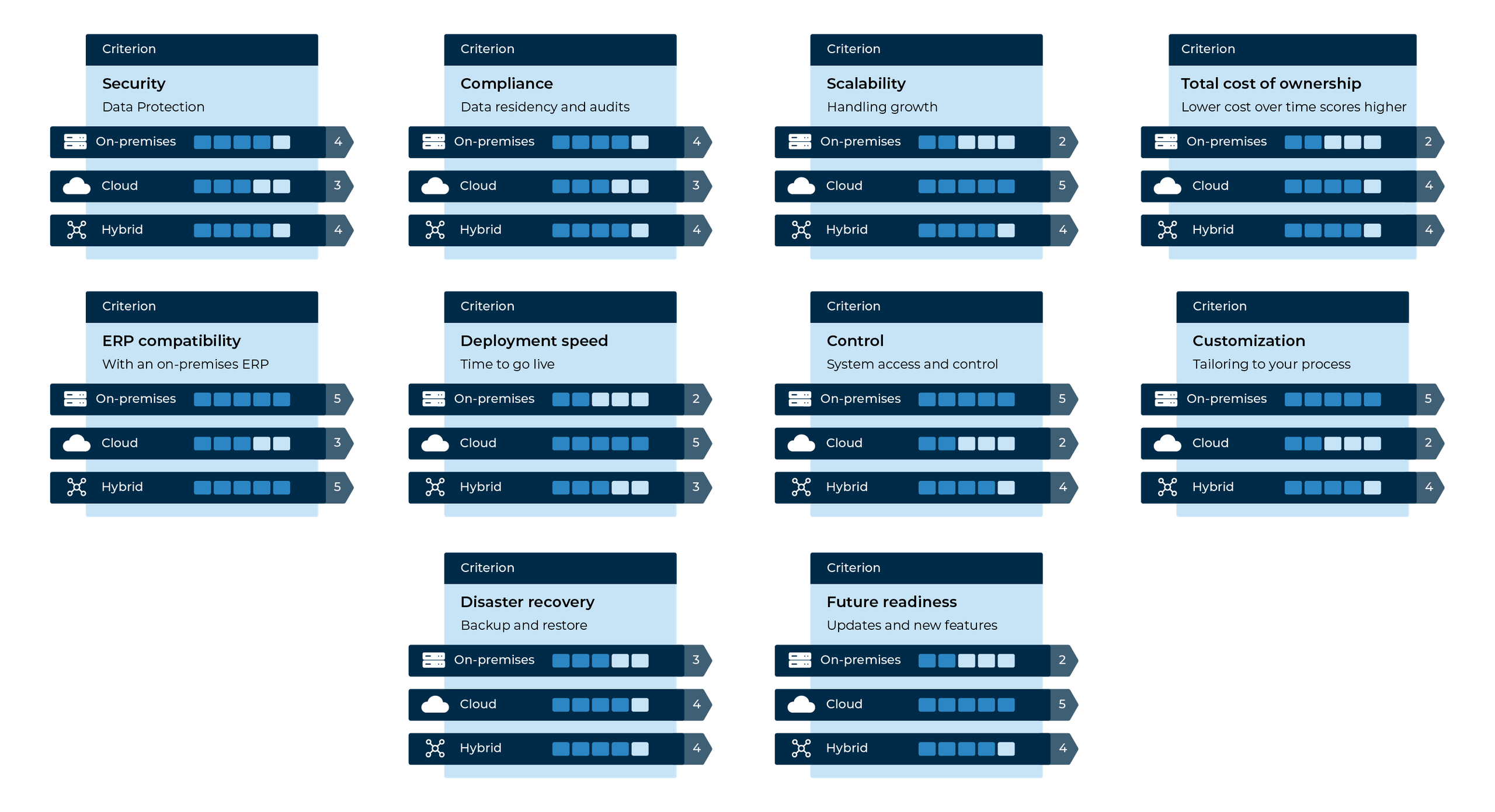
On-premise automation gives you control, cloud gives you speed, and hybrid lets you have the best of both while keeping your existing ERP data sanctity. The right choice depends on your ERP, data rules, compliance mandates, internal team strengths, and budget. Use the scorecard to rate each option against your priorities.
Symtrax’s Compleo Invoice Platform (CIP) is a hybrid AP automation platform. Book a demo to see how it works with your ERP and your data rules.
FAQs About Hybrid AP Automation
Hybrid AP automation runs some invoice tasks in the cloud and others on your own servers, linked by a secure sync agent.
It depends on your needs. Hybrid suits teams that must follow strict data residency rules or plan to move to the cloud gradually. Full cloud suits cloud-native teams that want the fastest start.
Security depends on how each platform is built and run. Hybrid gives you more control over where sensitive data lives, and strong SaaS vendors also invest heavily in security. Compare certifications, access controls, and audit trails.
Automation cuts manual entry, shortens approval cycles, and keeps a clear record of each invoice. Teams spend less time chasing approvers, and approved invoices post to your ERP with less typing.
Yes, if the platform has a connector for your ERP. SAP and Oracle are common examples, but support varies by vendor and version. Ask which ERP versions and modules are covered.
No. It is designed to work with the ERP you already have. It can also support a later move to a new ERP or the cloud, in steps.
The ERP database and sensitive financial data stay on your servers (on premises). The cloud handles invoice capture, extraction, and approvals. The exact split depends on your setup and data rules.
Yes, within limits. The cloud side can handle more invoices as volumes grow. The on-premises side scales with your hardware, so plan capacity for your ERP.
It depends on your ERP, integrations, and scope. A phased rollout can start with one process or entity, then expand. Ask your vendor for a plan with clear milestones.
ROI comes from lower processing costs, fewer errors, faster approvals, and better use of staff time. Your result depends on invoice volume and your current process. For how to calculate it, read our guide to the ROI of business process automation.