- What Is AP Digital Maturity?
- What Is Not AP Digital Maturity?
- Why AP Digital Maturity Matters Now
- The 6 Stages of AP Digital Maturity
- 5 Metrics for Measuring AP Digital Maturity
- Industry Benchmarks: Indicative Touchless Rate by AP Maturity Stage
- The 4 Dimensions Many Maturity Models Miss
- Signs Your AP Is Stuck at Stage 2 or 3
- How to Move Up the AP Maturity Model
- Frequently Asked Questions on AP Maturity
- Conclusion: Move Up the AP Maturity Model
Accounts Payable (AP) digital maturity is how much of your invoice process runs without human hands touching it. The AP maturity model shows where your team sits today, from manual AP to autonomous AP.
What Is AP Digital Maturity?
AP digital maturity measures the operational shift from manual work to automated execution. It tracks how efficiently invoices flow from initial reception to final ERP posting across your entire team.
What Is Not AP Digital Maturity?
Many finance teams label their AP process “automated” simply because they use OCR or a workflow tool. Your team may scan every invoice and still chase approvals by email. That is digital, but not mature. True AP digital maturity depends on how invoices move from reception to posting, not the software you own:
- OCR is not AP automation.
- Digital workflow is not touchless processing.
- ERP integration does not end manual work.
Many teams think their AP is automated, yet SSON’s 2026 State of Accounts Payable report shows 57% of organizations still have a touchless rate below 25%.
Why AP Digital Maturity Matters Now
Higher digital maturity means less time fixing invoices and more control over cash and risk. Moving up the AP maturity model delivers three core benefits:
- Headcount Optimization: Volumes grow faster than headcounts. Higher AP digital maturity cuts the average cost per invoice.
- Fraud Prevention and Compliance Risk: Manual and semi-digitized workflows create compliance vulnerabilities, exposing businesses to duplicate payments and fraud.
- Cash Flow and Discount Capture: A higher touchless rate shortens approval cycle time and helps you capture early payment discounts.
Let’s look at the 6 stages, the 5 metrics, and how to move up.
The 6 Stages of AP Digital Maturity
The AP maturity model has six stages, from paper-based AP to autonomous AP. Each stage reduces manual effort and raises your touchless rate.
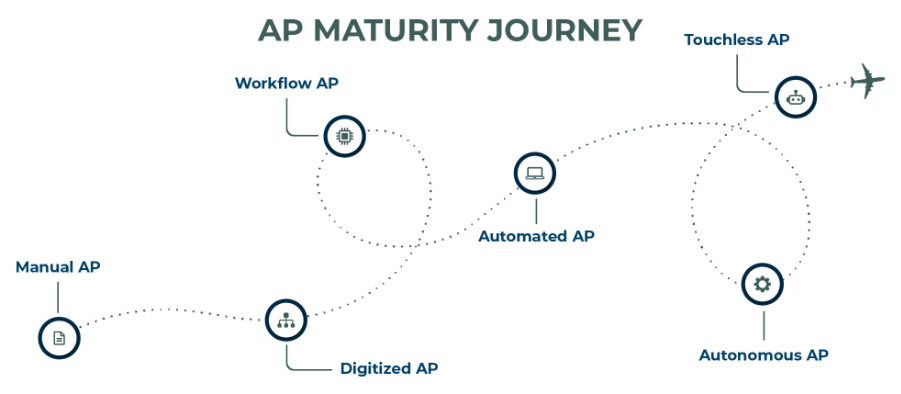
Stage 1: Manual (Paper-Based) AP
- Pain point: Invoices get lost, approvals stagnate, and no one can see what is owed.
- To move up: Digitize invoice capture with OCR.
Stage 2: Digitized (OCR-Based) AP
- Pain point: Staff still validate most invoices, so cost per invoice stays high.
- To move up: Replace email approvals with digital approval workflows.
Stage 3: Workflow AP
- Pain point: Mismatches and invoice exceptions still need manual fixes.
- To move up: Automate matching of invoices, purchase orders, and goods receipts, and connect AP to your ERP.
Stage 4: Automated AP
- Pain point: Non-PO invoices, poor vendor master data quality, and low PO coverage still require manual handling.
- To move up: Clean your vendor data, expand PO coverage, and apply policy-based cost allocation rules to automate both PO and non-PO invoices.
Stage 5: Touchless AP
- Pain point: Exceptions become the main constraint on further automation.
- To move up: Use AI to learn from past exceptions and fix their root causes, such as supplier data and GL coding.
Stage 6: Autonomous AP
- Pain point: AI acts on your data, so poor data or weak controls can lead to costly mistakes.
- To keep improving: Set clear boundaries for AI, and track touchless rate, exception rate, cycle time, and cost per invoice monthly.
5 Metrics for Measuring AP Digital Maturity
Track these five metrics to find your stage on the AP maturity model and to see progress as you move up.
1. Touchless Rate:
The share of invoices processed end-to-end with no manual intervention. According to SSON’s report, only 7% of organizations achieve a touchless rate of more than 75%.
2. Cost Per Invoice:
Measures the total expense of processing a single invoice, highlighting administrative and labor overhead. Typical costs drop from $12–$20 in manual AP to $1–$3 in touchless AP.
3. Cycle Time:
Tracks the average number of days it takes from invoice receipt to final approval. 26% of practitioners rank faster cycle time as the most valuable outcome.
4. Exception Rate:
The share of invoices that need manual fixes. In SSON’s survey, 37% of practitioners name non-PO invoices as their most common exception, followed by PO or price mismatches (30%) and missing or incorrect master data (22%).
5. Early Payment Discount Capture:
The share of available discounts you actually earn.
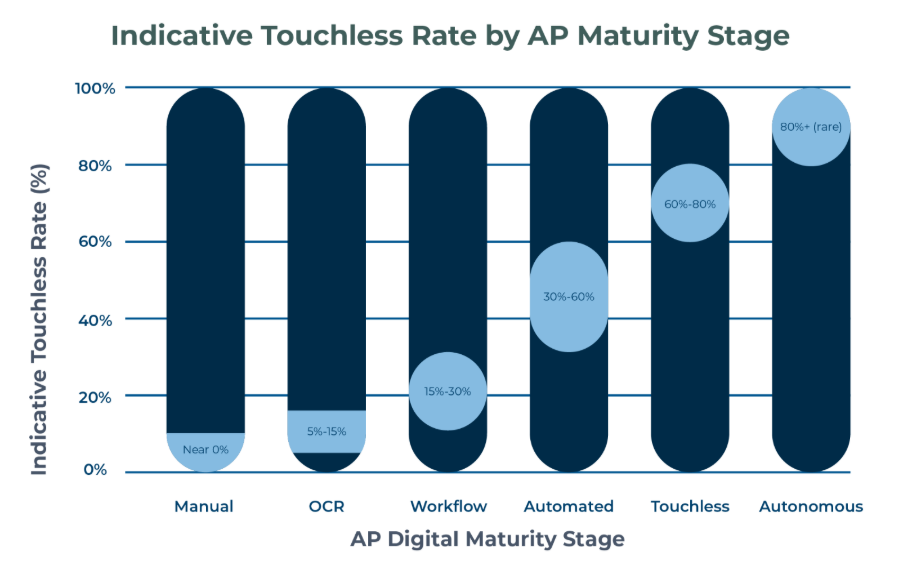
Industry Benchmarks: Indicative Touchless Rate by AP Maturity Stage
As your AP process moves from manual AP to autonomous AP, your indicative touchless rate climbs from near 0% to over 80%
The 4 Dimensions Many Maturity Models Miss
Many maturity models measure your level of automation. AP digital maturity also depends on four dimensions that decide how far touchless invoice processing can go.
1. Vendor Master Data Quality
Clean vendor records mean fewer matching errors.
2. ERP Integration
Two-way sync with your ERP, not manual file uploads.
3. PO Coverage
Invoices with a purchase order match automatically. Non-PO invoices pull your touchless rate down.
4. People and Controls
Clear approval rules, secure audit trails, and effective team change management.
Signs Your AP Is Stuck at Stage 2 or 3
Your AP may be digitized but still fragmented. Capture, matching, and approvals run in separate tools, so partial automation adds handoffs and visibility gaps. SSON’s 2026 report finds that 51% of organizations limit automation to isolated task-level use.
Real AP automation maturity comes from linking these steps into one controlled process. That connected foundation makes autonomous AP possible, with AI handling routine exceptions within set guardrails.
Watch for these signs:
- Staff still validate and code data by hand.
- Invoice exceptions and mismatches stall payments.
- No one can see invoice status or AP performance.
- Email-based approvals delay payments and strain supplier relationships.
- Cost per invoice stays high, and touchless rate stays low.
How to Move Up the AP Maturity Model
Moving through the AP maturity model stages, from manual AP to automated AP and autonomous AP, takes a clear roadmap. Start with your data, then connect your workflows. To successfully scale up the AP maturity curve, follow these steps:
1. Assess Your Current Stage
Measure the five metrics above to place yourself on the model.
2. Fix Vendor Master Data Quality First
Clean vendor and PO records before adding new automation.
3. Automate High-Volume, Low-Risk Invoices First
Target recurring vendor invoices for early wins.
4. Add Intelligent Exception Handling
Use automated routing rules to catch price mismatches and missing POs before they stall invoices.
5. Track Results and Expand
Watch cost per invoice, touchless rate, and exception rate, then roll out in phases.
Frequently Asked Questions on AP Maturity
AP digital maturity is how much of your invoice process runs without people touching it. It shows in cycle time, exception rate, cost per invoice, early payment discount capture, and touchless rate. The higher your maturity, the less manual work AP carries.
The AP maturity model has six stages: manual (paper-based), digitized (OCR-based), workflow, automated, touchless, and autonomous AP. Each stage reduces manual effort, from paper approvals to self-optimizing workflows.
You track your maturity using core operational metrics: touchless rate, cost per invoice, cycle time, exception rate, and early payment discount capture.
There is no single target. Track your own baseline and aim to move up a stage.
Digitized AP uses basic OCR to capture invoice data, but staff still validate the data and chase approvals. Automated AP uses ERP integration and rules-based matching to match and post invoices with little manual review.
It depends on your data quality, ERP setup, and scope, so there is no fixed timeline. Most organizations roll out in phases.
Conclusion: Move Up the AP Maturity Model
Higher AP maturity comes from clean data, connected workflows, and clear controls. Use the six stages and five metrics above to find your level, then fix your data first and automate step by step.
Ready to see where your team stands? The Symtrax Compleo Invoice Platform centralizes invoice intake, automates data capture, manages exceptions, routes approvals, and works alongside your existing ERP. Explore the Symtrax AP Automation Solution.